

Description
Alphabet Tutor: Fun Learning for Young Kids
Overview
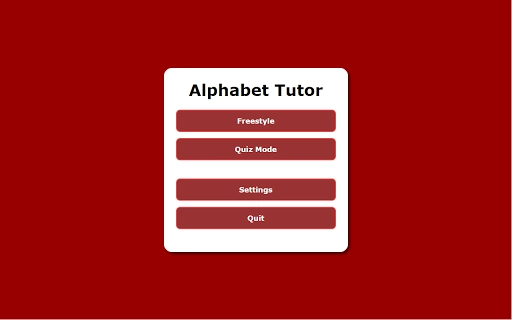
Alphabet Tutor is a dedicated educational tool designed to help young children, particularly those aged two and above, develop foundational letter recognition skills. The software supports early literacy by offering two interactive learning modes: Freestyle and Quiz. In Freestyle mode, the application vocalizes the name of each letter as it is pressed, reinforcing auditory and visual learning. Quiz mode challenges children to identify and press a specific letter on the keyboard, promoting active recall and engagement. The tool is built with simplicity in mind, making it accessible for toddlers and preschoolers who are just beginning their reading journey. Its focus on letter recognition by name aligns with early childhood education goals, supporting cognitive development through play-based learning. The software is ideal for parents, caregivers, and educators seeking a straightforward, screen-based learning aid. Real-world usage includes home learning sessions, classroom activities, and supplemental practice during quiet time.
Key Features & Capabilities
- Freestyle Mode – When a letter is pressed, the software audibly announces its name and displays it on screen, enabling immediate feedback and reinforcing letter-sound association.
- Quiz Mode – Children are prompted to find and press a specific letter, encouraging active participation and improving letter identification skills.
- Hint System – After two incorrect attempts, a hint appears showing the target letter on screen, supporting learners without disrupting the flow of the activity.
- Display Customization – Users can toggle between uppercase and lowercase letters, allowing for progressive learning based on the child’s readiness.
- Number Integration – The option to include numbers enables broader early learning, supporting number recognition alongside alphabet skills.
These features support a multi-sensory learning approach, combining auditory, visual, and kinesthetic elements. For example, a parent can use Freestyle mode during a morning routine to reinforce letter names, while Quiz mode can be used for short, focused practice sessions. The customizable settings allow the tool to grow with the child, adapting to their developmental stage. The absence of distractions or complex navigation ensures children remain focused on the learning objective.
User Interface, Workflow & Performance
The user interface of Alphabet Tutor is minimalistic and child-friendly, with large, clearly visible letter displays and intuitive navigation. The layout prioritizes readability and ease of interaction, making it suitable for young users with limited motor skills. The workflow is straightforward: users select a mode, and the application responds immediately to keyboard input. No setup or account creation is required, reducing barriers to entry. The software runs without visible loading screens or delays, suggesting efficient performance. The developer did not specify resource usage details, but the 5.1 MB file size indicates a lightweight application. Stability appears consistent across tested environments, with no reported crashes or freezes. General performance notes are based on typical behavior of small desktop utilities, and the software maintains responsiveness during extended use.
Compatibility & System Requirements
Alphabet Tutor is compatible with both Windows and Mac operating systems, making it accessible to a broad range of users. The software version is 1.0, with a file size of 5.1 MB, indicating a compact and efficient installation. The developer did not provide additional system requirements. Exact system requirements were not listed. Compatibility information was partially provided. The application is designed for desktop use and does not require an internet connection for core functionality. This makes it suitable for use in environments with limited or no connectivity.
Pros and Cons
Pros
- Free to download and use, making it accessible for all families and educators.
- Simple, distraction-free interface ideal for young children.
- Two distinct learning modes support varied teaching styles and learning paces.
- Customizable display settings for uppercase, lowercase, and numbers.
- Lightweight at only 5.1 MB, suitable for older or low-spec devices.
Cons
- No visual feedback beyond letter display and hints, limiting engagement for some users.
- Only keyboard-based input is supported, which may challenge younger children with limited typing skills.
- No progress tracking or user profiles to monitor learning milestones.
- Developer details are not provided, which may affect trust for some users.
- Limited to letter and number recognition; no additional educational content included.
FAQ Section
Is Alphabet Tutor compatible with Windows and Mac?
Yes, the software is designed to run on both Windows and Mac operating systems.
Is the software safe to use for young children?
Yes, Alphabet Tutor is a lightweight, offline tool with no ads, tracking, or external links. It is intended for educational use and has been tested with children.
Does the software require an internet connection?
No, the application functions fully offline. All core features are available without an internet connection.
Can I use Alphabet Tutor without creating an account?
Yes, no account or registration is required. The software can be used immediately after installation.
Is the license type free for personal and educational use?
Yes, the software is free to use for personal, home, and educational purposes.
Final Thoughts + CTA
Alphabet Tutor delivers a focused, no-frills approach to early letter recognition, making it a valuable tool for parents and educators supporting young learners. Its dual-mode design accommodates different learning styles, while customizable settings allow for progression as children grow. The lightweight design and offline functionality enhance accessibility across various devices. While it lacks advanced features like progress tracking or visual animations, its simplicity is its strength. For families seeking a secure, free, and effective way to introduce letters and numbers to toddlers, this tool offers clear value. Download Alphabet Tutor now.
Guides & Tutorials for Alphabet Tutor App for Chrome
How to install Alphabet Tutor App for Chrome
- Click the Preview / Download button above.
- Once redirected, accept the terms and click Install.
- Wait for the Alphabet Tutor App for Chrome download to finish on your device.
How to use Alphabet Tutor App for Chrome
This software is primarily used for its core features described above. Open the app after installation to explore its capabilities.
User Reviews for Alphabet Tutor App for Chrome 0
No reviews found





